Case Study / Augmented Reality & IoT
S-NODE AR App
An internship project at Dotcom IoT LLP that combines Unity, Vuforia, and C# to turn an Android tablet into a predictive-maintenance companion for S-NODE sensors. Scan a QR code, identify the device, and overlay live sensor data in augmented reality.
- Unity 3D 2021.3.19f1
- Vuforia 10.13.3
- C# Scripting
- MS SQL Database
- QR / Barcode Scanning
- Industry 4.0
- Predictive Maintenance
- Organization
- Dotcom IoT LLP
- Platform
- Android Tablet
- AR Engine
- Vuforia
- UI Scenes
- 11
00 / Demo
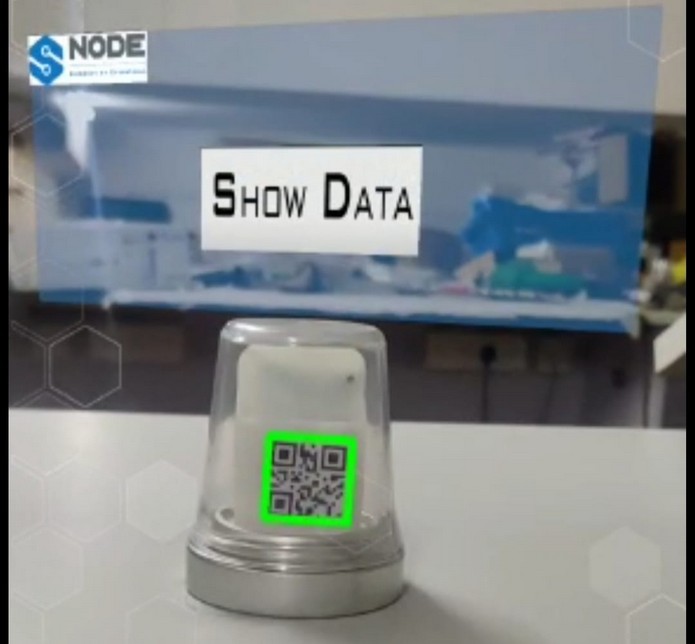
S-NODE AR in action
Screen recording of the Unity + Vuforia app scanning an S-NODE device and overlaying live sensor data.
Demo footage from the internship demonstration at Dotcom IoT LLP.
01 / Architecture
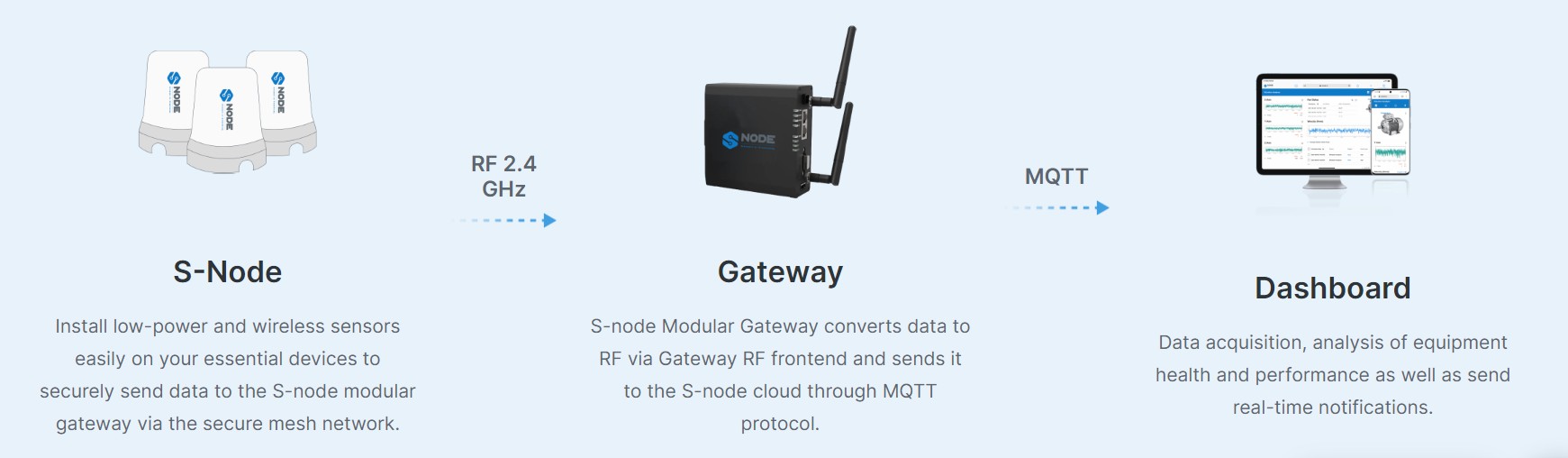
S-NODE ecosystem
The project sits on the full S-NODE IoT stack: wireless sensors, a gateway, cloud storage, and the AR tablet as the maintenance front-end.
02 / Pipeline
From scan to overlay
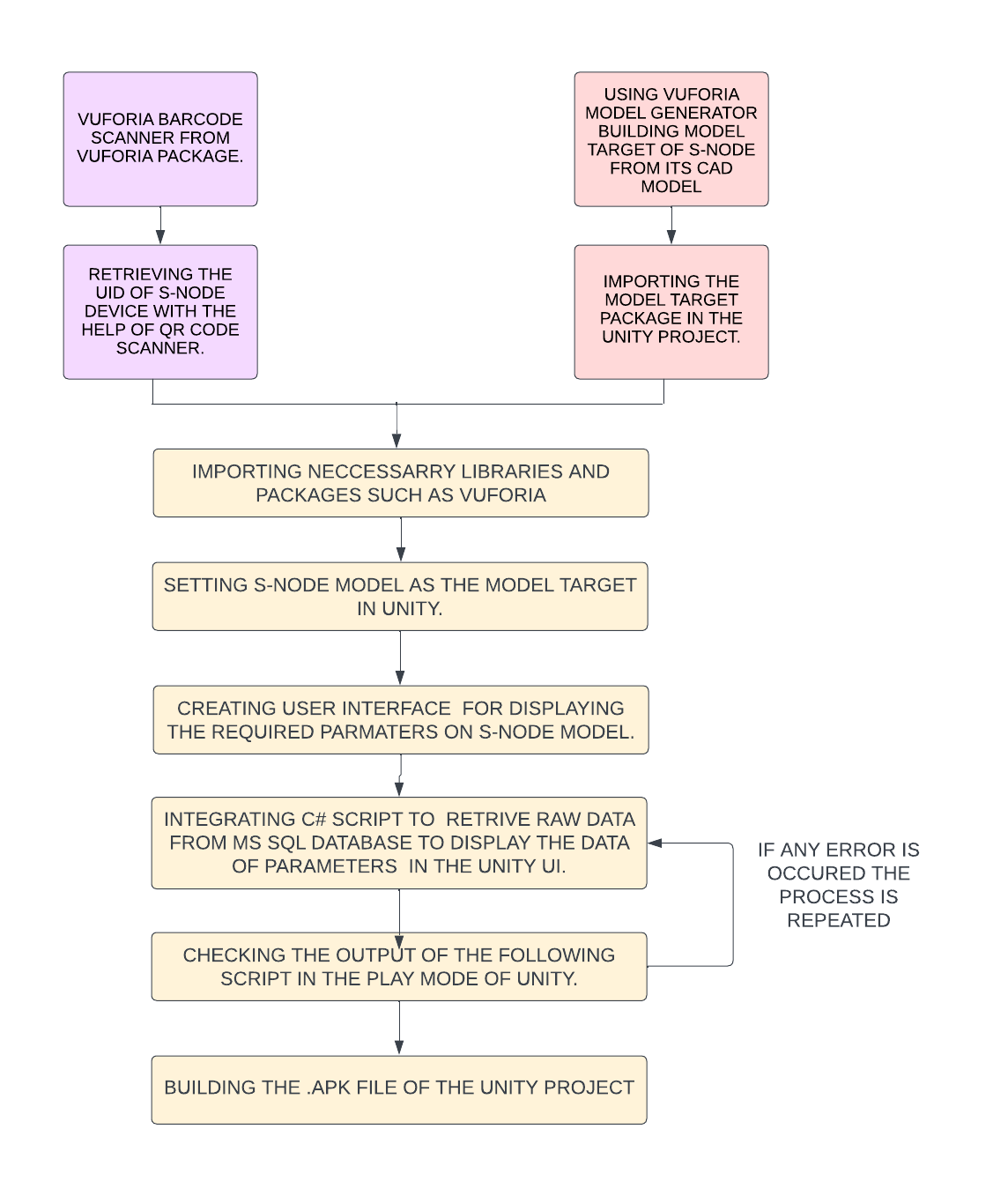
Four stages turn a QR code on a sensor into a live, world-space diagnostics panel.
01 — QR scan
Vuforia’s BarcodeBehaviour reads the QR code printed on the S-NODE device and stores the decoded UID for the current session.
BarcodeBehaviour · TextMeshPro · UID capture02 — Device lookup
The C# backend opens a connection to the MS SQL database and queries the device record matching the scanned UID.
SqlConnection · SqlCommand · SELECT TOP 103 — Scene switch
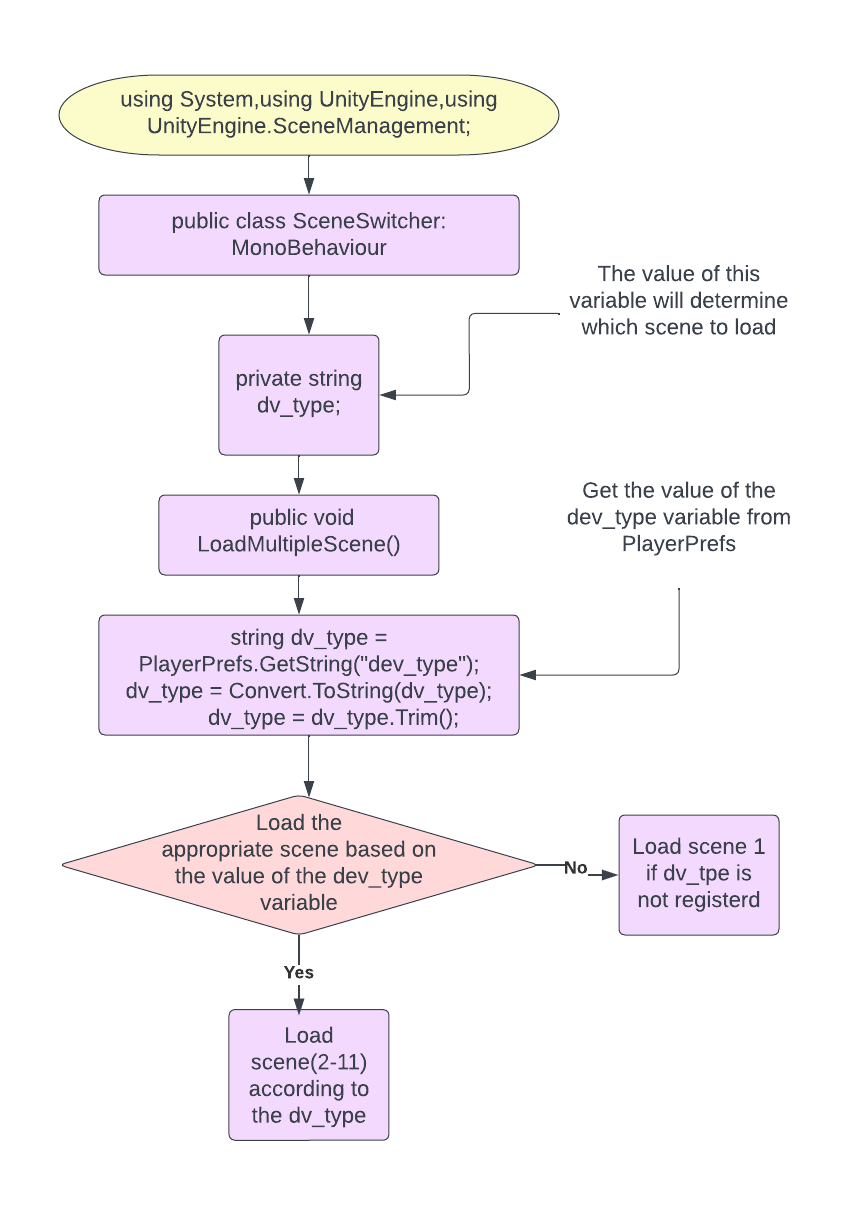
Based on the device type returned by the database, SceneSwitcher.cs loads the matching UI scene (Environment, Vibration, Thermal, etc.).
SceneManager.LoadScene · 11 device-type UIs04 — AR data overlay
The selected scene renders world-space UI panels anchored to the device, polling the SQL table for the latest sensor readings.
World-space Canvas · Data refresh loop · AR camera
03 / Code Flow
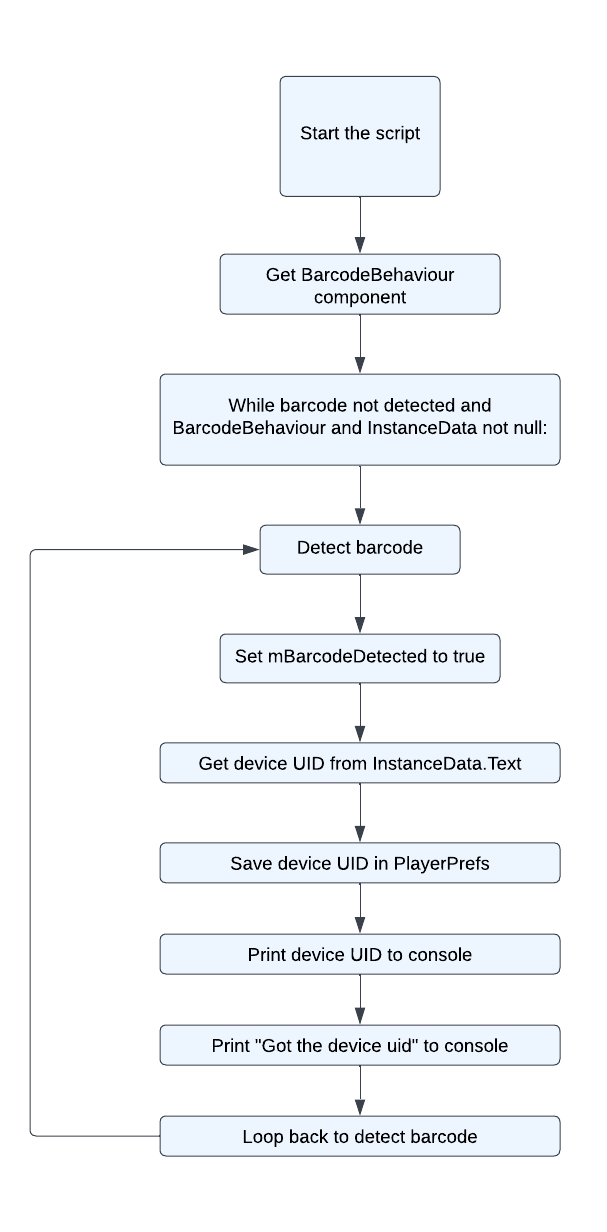
How the app decides what to show
Vuforia handles recognition, C# handles decision-making, and the Unity scene manager swaps the UI for the detected sensor type.
04 / Features
What the app does
Built for maintenance technicians who need asset-specific data without leaving the equipment.
QR-driven device pairing
No manual serial entry — point the tablet at the device label, scan the QR code, and the app resolves the UID to the database record.
Type-aware UI scenes
Eleven distinct UI prefabs cover Environment, Vibration, Thermal, and other S-NODE sensor variants, each tuned to the data it displays.
Live SQL data binding
C# scripts query MS SQL on demand and refresh the AR panels, giving technicians current readings without leaving the equipment.
World-space telemetry cards
Sensor values float next to the physical hardware in world space, so the operator’s eyes stay on the asset while reading diagnostics.
One-handed tablet workflow
Designed for shop-floor use: scan, tap Show Data, and read — no laptop, no paper log, no separate HMI terminal.
Predictive-maintenance ready
By surfacing temperature, humidity, pressure, and vibration in context, the app supports early fault detection and condition-based servicing.
05 / Stack
Technology stack
A single Unity project, one Vuforia target pipeline, and a C# / SQL backend to drive the content.
| Component | Role | Notes |
|---|---|---|
| Unity 3D 2021.3.19f1 | AR interface & scenes | Vuforia integration, world-space UI, scene management |
| Vuforia 10.13.3 | Object & QR recognition | BarcodeBehaviour for device QR code scanning |
| C# .NET | Backend logic | SQL queries, scene switching, UI state management |
| MS SQL Server | Sensor data store | Device registry, live telemetry tables |
| TextMeshPro | AR typography | Crisp, scalable labels in the camera view |
| Android tablet | Deployment target | Portable shop-floor maintenance companion |
06 / Output Gallery
Live AR overlays
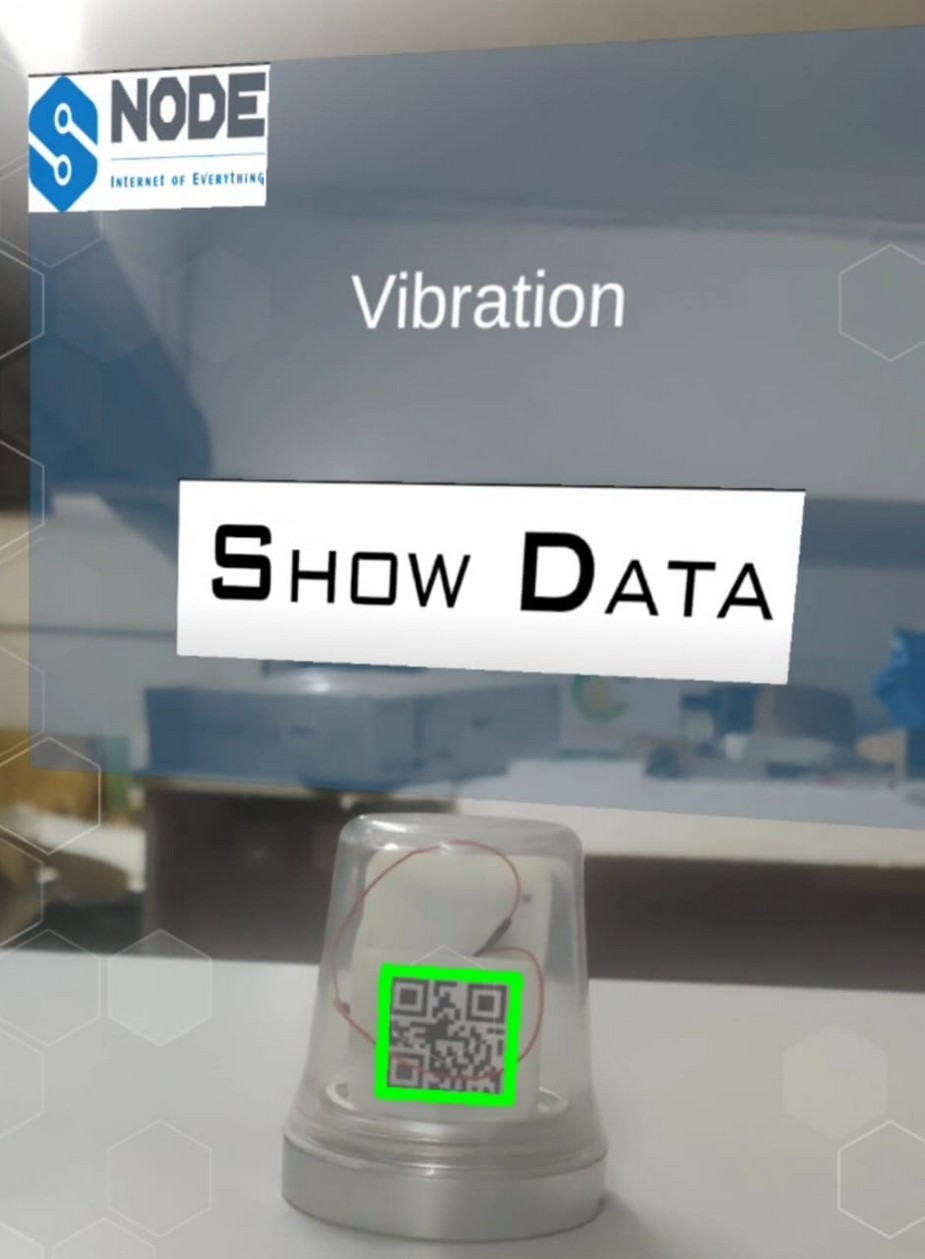
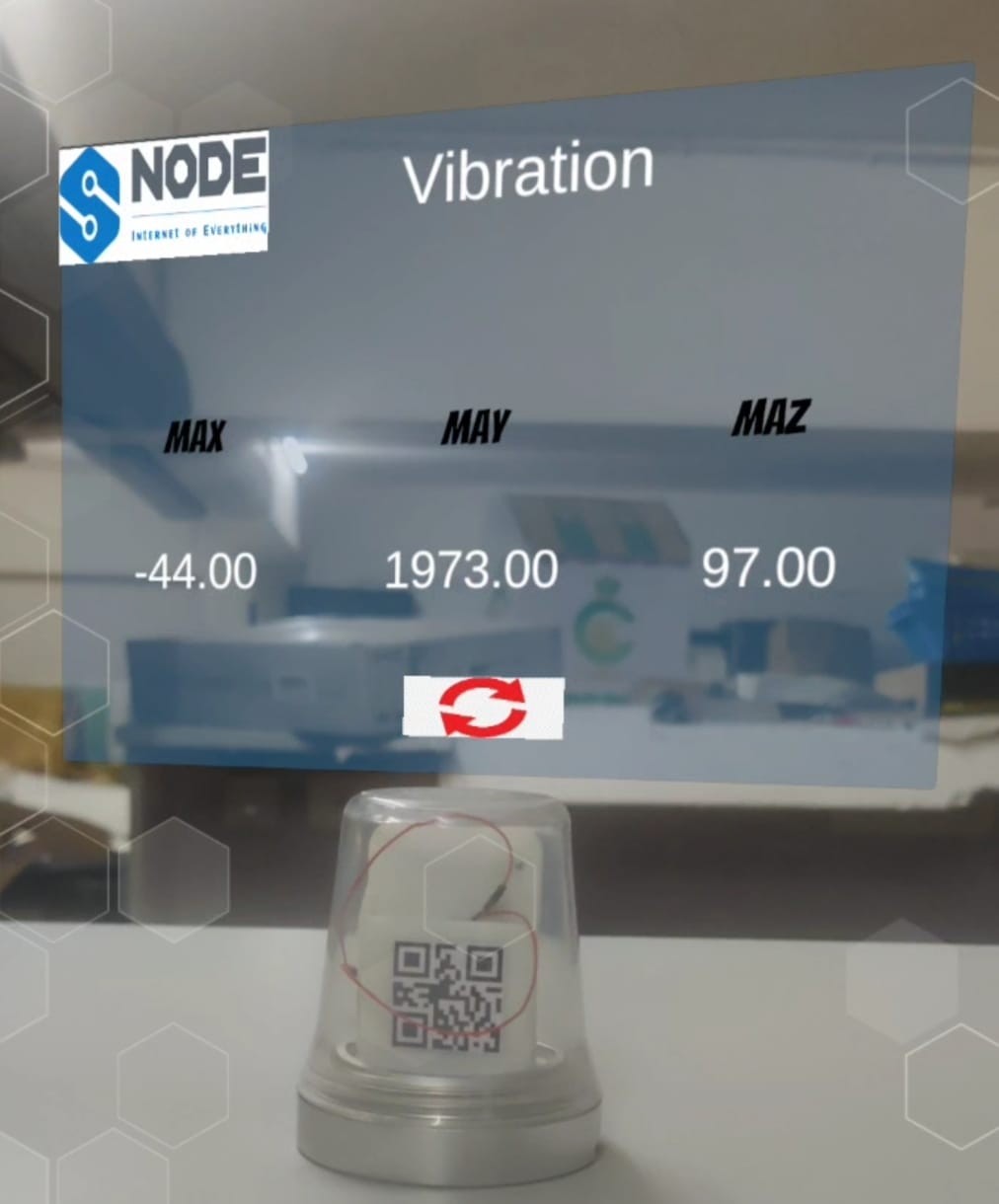
Scanning the device brings up the matching sensor UI; tapping Show Data refreshes the live reading from the MS SQL backend.
Vibration diagnostics
The vibration scene shows peak acceleration values across the three axes (MAX, MAY, MAZ). In the captured run the device reported MAX −44.00, MAY 1973.00, and MAZ 97.00.
07 / Takeaways
Key learnings
What the internship proved about shipping AR on the factory floor.
AR closes the loop between asset and data
By anchoring sensor readings to the physical device, the app removes the context-switching between a paper tag, a handheld meter, and a desktop dashboard.
QR codes make pairing invisible
Scanning the device label turned a multi-step lookup into a single camera gesture, reducing the chance of querying the wrong asset on a busy floor.
Scene-per-sensor keeps the UI simple
Dedicating one Unity scene to each sensor type meant each screen could show exactly the channels that matter, instead of a generic, cluttered layout.
Database latency matters in AR
Polling MS SQL from a tablet over the shop network required careful query scope and UI debouncing; the overlay must feel instant even when the network does not.
Maintenance tools must be shop-floor tough
A one-handed tablet workflow, large readable values, and high-contrast panels made the app usable while wearing gloves and standing next to running equipment.